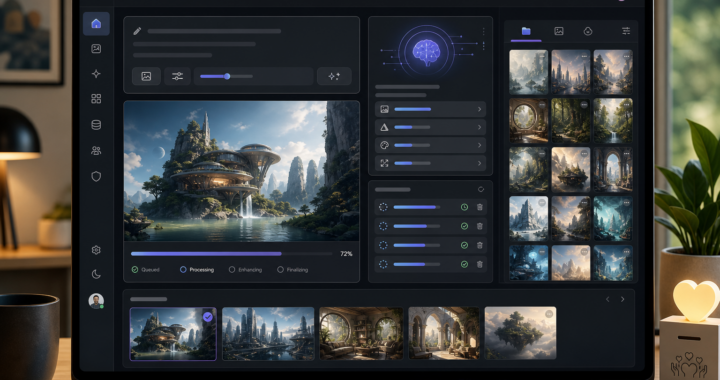
AI image editor interface with a futuristic landscape preview and generation progress at 72%

AI image generation is now live in Tools

Tools now has a working image-generation feature that is already in use and confirmed through the X-bot flow. It can generate images directly in Tools and store them in the project’s image archive for reuse in later workflows.

This is a practical feature for quick visual drafts, concept images, and supporting material without leaving the Tools environment.

Real use, not only a preview

The feature is not just a test setup. It is live and working in the current Tools setup, with generated images handled as background jobs so the request does not block the rest of the work.

That makes the feature useful both for normal web/API use and for X-bot-driven flows where an image is part of the response or follow-up content.

Easier to reuse and keep track of

Generated images can be saved in the built-in image archive and reused later, which helps when a concept or draft needs to be refined or referenced again. This makes the feature more useful than a one-off generation request.

Fair usage and responsible availability

AI image generation has a real cost per request. Access is therefore still managed with sensible limits and abuse protection so the service remains available for real users instead of being consumed by a single heavy script or workflow.

Support the project

Tools is kept available as a public service, but servers and AI usage still cost money. If you want to help keep the more expensive features running, donations and recurring support are very welcome.

Support the project through Ko-fi:

https://ko-fi.com/tornevall

Let’s Encrypt, DNS, job searching and the growing “put everything in Tools” toolbox

ToolsAPI started as my personal toolbox: a place for utilities I knew I would actually use myself. That idea still exists. It has just developed a slight case of “THIS SHOULD PROBABLY GO INTO TOOLS TOO”.

What began with technical helpers is turning into a much broader collection of services for infrastructure, automation and ordinary everyday problems. The direction is starting to resemble the IFTTT-like integration platform I have also been exploring: different services, triggers and actions gradually meeting in the same place.

ToolsAPI now includes certificate distribution, DNS administration, assisted job searching and personal reminder services. These are quite different problems, but most of them have entered Tools for the same reason: I ran into something repetitive, awkward or easy to forget and thought, “I can probably automate that.”

Let’s Encrypt certificates in one place

One of the latest additions is central Let’s Encrypt certificate management.

Certificates created by Certbot can be published to Tools after issuance or renewal. Tools validates the certificate material, stores it privately and associates it with the account that should have access to it. The latest PEM bundle can then be downloaded manually or fetched automatically from another server using a protected token.

This is useful when the machine issuing a certificate is not the same machine that needs to use it. Tools can act as a small distribution point between Certbot, servers and the people responsible for the certificate.

Certificates keep the same public UUID across renewals, while access tokens can be rotated separately when needed. The interface also shows the domains included in a certificate, its current status, expiry and latest upload.

In other words: Certbot can keep doing what Certbot is good at, while Tools handles the “now how do I safely get this certificate over there?” part.

DNS administration is connected to certificate access

The certificate service is also connected to the DNS editor.

An enabled certificate assigned to a user can grant access to the matching DNS zone, so the same domain does not need a separate DNS permission entry just to be managed by the certificate owner.

The DNS editor itself makes it possible to work with zones and records from the web interface instead of editing zone files by hand. Access can be delegated per user, records can be searched and updated, and the same interface can work with zones backed by an external provider such as Cloudflare.

For locally managed zones, Tools can use cached zone data and refresh it from the authoritative source when needed. The API exposes the same basic operations for integrations and automation.

DNS is one of those things that works beautifully right up until the exact moment when you urgently need to change something. Having the records, permissions and certificate relationship visible in one place makes that considerably less entertaining.

A job search agent that can keep looking

Job hunting is another repetitive workflow that somehow found its way into the same toolbox.

The Job Search agent works from a personal search profile describing locations, types of work, keywords, exclusions and additional instructions. It searches for current listings on the web and performs additional checks on the result pages before they are accepted.

The service is intended to reduce repeated searching and cut down on listings that are already gone or clearly irrelevant.

Results can be reviewed in Tools, and unwanted listings can be dismissed so the same result is not repeatedly presented to the same account. Scheduled searches can reuse the profile and continue looking for new opportunities over time.

AI is used to help search, sort and compare results. The person using the service decides which listings are worth reading or applying for.

The basic idea is fairly simple: if finding a job is already work, there is no particular reason to manually redo exactly the same search every morning.

As a parent, I also wanted a simpler menstrual reminder

Then there are features that are considerably less server-shaped.

As a parent, keeping track of dates and remembering when the next period may be approaching is the kind of recurring everyday task where a small reminder can genuinely help. So, naturally, that ended up in Tools too.

The menstrual tracking service allows period starts to be registered and used to build a cycle history. From that history, Tools can show information such as average cycle length, the latest registered start and an estimated next start.

Optional SMS reminders can be enabled a selected number of days before that estimate. Accounts can also be linked so the same reminder can be sent to a parent. The menstrual profile belongs to the person being tracked, and delivery to each recipient is handled separately.

The service can also be used without SMS as a personal history of registered cycles.

It is probably not the first feature people expect to find next to DNS and Let’s Encrypt certificates, but that is increasingly the point of Tools: useful things do not always belong to the same category before they become useful together.

The toolbox is getting suspiciously large

There is still a personal-toolbox idea at the core of ToolsAPI. I tend to build things because I have an actual use for them, or because someone close to the project has a concrete problem worth solving.

The difference now is that the boundary has become much wider. Infrastructure tools can connect to account permissions. Certificates can connect to DNS. Search agents can run scheduled work. Reminder services can react to dates and user settings.

That is also why the IFTTT-like direction is interesting. Instead of treating every feature as an isolated application, more of Tools can eventually become reusable building blocks: something happens here, which triggers something useful over there.

At the current rate, the technical design principle may eventually just become: “Fine. Put it in Tools.”

ToolsAPI is actively developed, and suggestions are useful while this slightly overenthusiastic toolbox continues to grow. If something is missing, awkward or unnecessarily complicated, feedback and improvement ideas are welcome.

Jobbsökningsagenten som hjälper dig att leta efter rätt jobb

Att leta jobb kan lätt bli ett eget heltidsjobb. Samma sökningar ska göras om och om igen, annonser ska öppnas, arbetsgivare jämföras och gamla träffar sorteras bort. Därför finns Job Search i Tools – en personlig jobbsökningsagent som gör en stor del av det återkommande letandet åt dig.

Tanken är inte att agenten ska välja jobb åt dig. Den ska hjälpa dig att hitta sådant som faktiskt verkar relevant, så att du kan lägga mer tid på de annonser som är värda att läsa och mindre tid på att upprepa samma sökningar.

Du beskriver vad du letar efter

I Job Search bygger du upp en egen sökprofil. Där kan du tala om exempelvis vilka orter du är intresserad av, vilka typer av jobb du söker, vilka ord eller områden som är viktiga och sådant du helst vill slippa få träffar på. Det går också att ge agenten egna instruktioner. En sökning kan därför vara betydligt mer personlig än en vanlig lista med några nyckelord.

Du kanske söker arbetsledande jobb inom grönytor i nordvästra Skåne, men även kan tänka dig lager eller butik. Eller så är distansarbete intressant, medan vissa typer av tjänster inte alls är det. Sådana skillnader kan agenten ta hänsyn till när den söker.

Agenten söker på webben åt dig

När sökningen körs använder Tools din profil för att leta efter aktuella jobb på webben.

Agenten försöker inte bara hitta sidor där några av dina sökord råkar förekomma. Den bedömer också hur väl en träff stämmer med det du faktiskt har beskrivit att du söker.

Land, orter, yrkesområden, nyckelord, undantag och dina egna instruktioner följer med som en del av sökningen.

Träffarna kontrolleras innan de visas

Jobbsajter förändras snabbt. En annons kan tas bort, flyttas eller leda till en sida som inte längre innehåller jobbet som först hittades.

Därför gör Tools en extra kontroll av träffarna innan de godkänns. Målsidan ska gå att nå och grundläggande uppgifter som jobbtitel, arbetsgivare och plats ska gå att hitta.

Det minskar mängden döda länkar och märkliga träffar som annars lätt följer med automatiserade sökningar.

Du bestämmer vad som är intressant

/job-search kan du öppna originalannonsen direkt och gå igenom de jobb agenten har hittat.

Om en annons inte är intressant kan du dölja den. Tools kommer då ihåg det för just ditt konto och försöker inte presentera samma annons för dig igen bara för att den dyker upp i en senare sökning.

Det påverkar inte andra användare. Job Search är byggd runt varje användares egen profil, historik och val.

Återkommande sökningar utan att börja om från början

En av poängerna med en agent är att du inte ska behöva göra exakt samma arbete varje dag.

Job Search kan köras återkommande och använda samma personliga sökprofil när nya jobb letas fram. När en schemalagd sökning är aktiverad kan resultatet sammanställas och skickas vidare som en rapport.

Systemet håller samtidigt reda på tidigare träffar och sådant du redan har valt bort, så att sökningen kan fortsätta där den förra slutade i stället för att hela tiden börja om från noll.

En agent som ska hjälpa – inte bestämma

Job Search använder AI och aktuell information från webben för att sortera, jämföra och kontrollera sökresultat. Det innebär inte att varje bedömning automatiskt är rätt.

Se därför agenten som ett extra par ögon. Den kan göra grovjobbet, hitta kandidater och minska mängden manuellt letande, men det är fortfarande du som avgör om ett jobb passar, om arbetsgivaren verkar intressant och om du vill söka tjänsten.

Verktyget finns på https://tools.tornevall.net

Håll koll på mensen med Tornevalls Tools

Att komma ihåg när mensen började senast, räkna fram ungefär när nästa period väntas och samtidigt hålla reda på när det börjar bli dags kan vara lättare sagt än gjort. Därför finns nu en menskalender i Tornevalls Tools som hjälper till att hålla reda på datumen och kan skicka en påminnelse innan nästa mens väntas börja.

Tanken är att verktyget ska vara enkelt att använda. Du registrerar när mensen börjar, och Tools använder de registrerade uppgifterna för att hjälpa till med planeringen framåt.

Få en påminnelse innan det är dags

Det går att ställa in hur många dagar före den beräknade mensen som en påminnelse ska skickas.

Påminnelsen skickas med SMS till användarens registrerade mobilnummer. Om tiden för den vanliga påminnelsen redan har passerat kan systemet i stället skicka den så snart som möjligt.

Det gör att tjänsten även kan användas utan att man behöver komma ihåg att gå in och kontrollera kalendern hela tiden.

Fler kan hjälpas åt

Menskalendern är inte begränsad till att endast personen som menstruerar behöver hålla reda på allt själv.

Det går även att koppla en annan användare till profilen, till exempel en förälder som hjälper sitt barn eller sin ungdom att hålla koll på när nästa mens närmar sig.

Påminnelserna hanteras för varje användare, vilket innebär att flera personer kan få information när det behövs.

Ett enkelt vardagsverktyg

Målet med menskalendern är inte att bygga en komplicerad hälsoapp fylld med funktioner som alla kanske inte behöver.

Grundfunktionen är betydligt enklare: registrera mensen, håll reda på cykeln och få en påminnelse när nästa period börjar närma sig.

Tjänsten är en del av Tornevalls Tools och kan fortsätta utvecklas efter hand.

Har du idéer på hur den kan bli bättre?

Mens och menscykler fungerar olika för olika personer, och det finns därför säkert funktioner eller situationer som vi inte har tänkt på ännu.

Om du använder tjänsten och saknar något, tycker att något borde fungera annorlunda eller har en idé som skulle göra menskalendern mer användbar, får du gärna höra av dig med förslag.

Även små förbättringar kan göra stor skillnad när ett verktyg ska fungera i vardagen.

Tornevall Networks is exploring an IFTTT-like integration platform

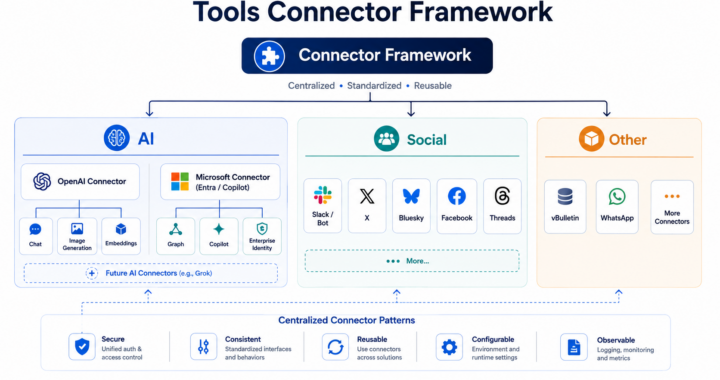
Tornevall Networks is currently exploring a new integration layer for ToolsAPI called ToolsAPI Platform Bridge.

The basic idea is similar to services such as IFTTT: connect systems that normally operate separately, let an event in one system trigger something in another, and make those connections manageable from one place.

ToolsAPI already communicates with several external systems today, but many of those integrations have been built for one specific purpose. Platform Bridge would provide a common foundation instead.

Connecting more than social media

The original idea started around social platforms such as Facebook and Bluesky, but it quickly became clear that the same concept can be useful far beyond social media.

A platform could just as easily be Dropbox, OneDrive, Slack, Microsoft Teams, GitHub, Bitbucket, Jira or a forum.

ToolsAPI’s existing vBulletin integration is particularly interesting here. Instead of treating the forum as a separate system, Platform Bridge could make forum activity part of larger automated workflows.

A newly published WordPress article could, for example, create a forum thread, publish a post on Bluesky and Facebook, store related material in Dropbox or OneDrive and send a notification to Slack or Teams.

The flow could also start in the other direction. A new forum thread could trigger publication elsewhere, a GitHub pull request could result in a notification or another action, and changes in Jira or Bitbucket could be connected to other services.

Triggers, conditions and actions

The planned model is deliberately simple:

Something happens -> optional conditions are checked -> one or more actions are performed.

A trigger could be a new article, forum thread, uploaded file, received message, repository change or scheduled task.

Conditions could decide whether the workflow should continue. An automation may only apply to one forum section, a particular WordPress category, a specific repository or files placed in a certain directory.

Actions could then create a thread, publish a post, send a message, upload a file, create an issue or call another ToolsAPI service.

The individual services would still work very differently behind the scenes. Platform Bridge would provide a common layer so the rest of ToolsAPI does not need to understand every external API separately.

A growing list of possible platforms

Current candidates include Facebook, Instagram, WhatsApp, Bluesky, Slack, Microsoft Teams, Dropbox, OneDrive, vBulletin, WordPress, GitHub, Bitbucket and Jira.

Other services such as Discord, Telegram, Matrix, Mastodon, GitLab, Google Drive, SharePoint and generic webhooks are also natural candidates for later integration.

Not every service provides the same possibilities, and some integrations will inevitably be easier than others. The Bridge is therefore being designed around capabilities rather than assuming that every platform can perform the same operations.

Keeping track of what happened

Automation becomes considerably less useful when nobody knows why something failed.

Platform Bridge is therefore also intended to keep a history of events and individual actions. If one automation publishes to three services and one of them fails, the successful actions should remain successful while the failed action can be retried separately.

The same tracking can also prevent loops. If ToolsAPI creates a Facebook post from a forum thread, an incoming event for that Facebook post must not accidentally create another forum thread and start the same process again.

Connections between objects can also be remembered. ToolsAPI could know that a particular WordPress article belongs to a specific forum thread, Facebook post and Bluesky post, making future updates and cross-platform management possible.

Still at an early stage

ToolsAPI Platform Bridge is currently an architecture and development concept rather than a finished service.

The first work is focused on defining a common provider model, connections, triggers, actions, event handling and the database structure needed to support them safely.

The intention is to let existing ToolsAPI integrations gradually become part of the same system while leaving room for completely new platforms later.

In other words, the interesting part is no longer simply getting ToolsAPI to talk to another API.

It is getting all of those systems to talk to each other.

Tools now has central Let’s Encrypt certificate management

Tools has gained a new central function for receiving, storing and distributing Let’s Encrypt certificates between servers and user accounts.

Certificates that are already created with Certbot can be published to Tools after issuance or renewal. Tools validates the material, stores the PEM files privately and associates the certificate with the correct account. Certbot still handles the actual issuance process – Tools acts as the bridge for access, downloads and administration.

Certificates are collected in one place

Signed-in users can see the certificates assigned to their own account. The interface shows information such as domain names, additional included domains, status, expiry and when the certificate was last updated.

Administrators can assign owners, enable or disable certificates and manage download tokens.

External views and downloads identify certificates by UUID, so internal database IDs do not need to become public identifiers.

Download in the browser or automate it

The latest certificate bundle can be downloaded directly from Tools. A bundle can contain cert.pem, chain.pem, fullchain.pem, privkey.pem and metadata.

Servers that need to retrieve renewed certificates automatically can use the token-protected API download. The same certificate UUID can continue to be used after renewal, while the token can be rotated when necessary.

Ready-made shell and Windows/curl examples are included so another server can fetch the latest certificate without manual handling.

Renewal and import are designed to survive interruptions

Existing Certbot certificates can be imported into Tools. The import utility reports which certificates were published, queued for another attempt or skipped.

If Tools cannot be reached during publication, valid certificate material can be placed in a local retry spool instead of turning the entire renewal flow into a failure. Certbot material under /etc/letsencrypt remains the source and is not modified by the Tools bridge.

A certificate can also unlock its DNS zone

Certificate management is now connected to the DNS editor. An enabled Let’s Encrypt certificate assigned to a user can grant access to the DNS zone covered by that certificate. Wildcard domains are normalized before matching.

This means a user responsible for a certificate does not also need a separate DNS permission for the same zone just to manage it. Existing explicit DNS permissions continue to work as before.

Private key material is handled separately

Public certificate information can be displayed and used in more places, while private key material is treated as sensitive content. Download and administrative paths verify ownership and permissions before private files are released.

The result is a clearer path from Certbot to Tools and onward to the server or user that actually needs the certificate, without placing private PEM files in a public web structure.

SocialGPT 1.2.19 makes fact verifications easier to save, read, and share

SocialGPT 1.2.19 improves the workflow around “Verify fact”. A successful verification no longer has to be something you read once and then lose track of. The result can be saved as a fact card in Tools, reopened later, and shared when needed.

The update also makes troubleshooting clearer when a verification takes a long time or does not behave as expected.

Verifications are saved automatically

When a fact verification succeeds, it is saved as a fact card in the Tools account. This makes it possible to return to an earlier check without running the same search again.

It also becomes easier to review sources at your own pace, compare several verifications, and use an earlier result as a reference.

Saved fact cards can be shared

A saved fact card can receive a public share link. The same finished version can then be opened by somebody else without running the verification again.

This is useful when a result needs to be forwarded, used in a follow-up, or kept as supporting material for other documentation.

A more readable format

Fact cards are displayed in a more editorial format than before. Better Markdown support makes headings, lists, and links easier to read when a result is reopened or shared.

For the user, the result feels more like a finished text and less like raw internal output.

Discreet debugging when it is needed

The verification box now has a small dbg opener. It can show which phase the check is in, how long different parts take, timeout information, transport details, and a compact preview of the response or error.

The troubleshooting view stays out of the way until it is needed. It has its own scrolling area, and its content is easier to read and copy.

Timeout handling now also uses the same logic as other AI calls in the tool. A verification that becomes stuck should therefore no longer be able to keep counting indefinitely without ending clearly.

Clearer Facebook workflows

The Facebook-related admin and review workflows also provide a better overview. The panel more clearly shows queue and duplicate-checking status, the latest batch result, and when scrolling has reached content that is already known or previously sent.

This makes it easier to follow what the tool is actually doing without having to interpret internal details.

Is FraudBL.org dead?

No!

We have evolved.

FraudBL.org has been unusually quiet for several years. From the outside, that may look like the project has been abandoned.

That is not what has happened.

FraudBL has gradually become part of a larger rebuild within Tornevall Networks. Instead of continuing to maintain FraudBL as an isolated website with its own aging infrastructure, much of the technical work is now taking place through Tornevall Networks Tools.

The name FraudBL remains. The DNS-based reputation service remains. What has changed is where the surrounding tools, administration and future development are being built.

From a separate website to a wider platform

FraudBL was originally created as a specialized blacklist for IP addresses associated with phishing, fraud and other activity that could cause financial harm.

The public website at FraudBL.org became the recognizable home of the project. Behind the website, however, FraudBL has always depended on DNS infrastructure, classification rules, reporting sources, maintenance tools and administrative processes.

Those parts are now being brought closer together.

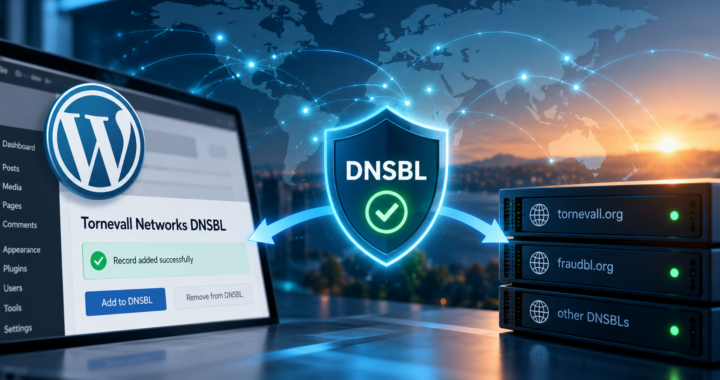
The current DNSBL and FraudBL architecture is increasingly managed through ToolsAPI at tools.tornevall.net. Reputation information is still primarily consumed through DNS lookups, while Tools provides the interfaces used to inspect, maintain, publish and remove DNS-backed records.

The active and historical DNS zones include:

  • dnsbl.tornevall.org
  • bl.fraudbl.org
  • ecom.fraudbl.org
  • opm.tornevall.org

Tools can perform live checks across the relevant zones, combine returned classification flags and handle record publication through the current DNS infrastructure. Public DNSBL statistics and selected whitelist information are also available through Tools.

The old API model has also changed

Earlier integrations were built around older versions of the Tornevall Networks DNSBL API. Those APIs allowed external systems to check, add, update and remove blacklist records through a traditional HTTP interface.

That older request model is no longer the primary public contract.

The current structure is based on DNS publication, direct DNS resolution and ToolsAPI endpoints for the administrative and specialized parts of the system. Consumers such as the Tornevall Networks WordPress plugin can perform normal reputation checks directly through DNS while using Tools for functions such as token validation, statistics, administration and controlled removal workflows.

This has also made it possible to improve several parts of the system that were previously fragmented:

  • DNSBL record inspection.
  • Token-backed access.
  • Addition, update and removal workflows.
  • Bulk operations.
  • Dry-run validation.
  • Public and internal statistics.
  • Whitelist and local-network handling.
  • Operator tools for inspecting existing reputation flags.

The work is still ongoing. Some parts are public, some are intended for delegated integrations and some remain operator tools.

FraudBL is still available through DNS

Ordinary users of the blacklist do not need to communicate with ToolsAPI for every lookup.

FraudBL remains a DNS-based service. A mail server, website, plugin or other application can query the relevant DNS zone and interpret the returned address as a bitmask.

Each flag represents a particular type of reputation information. Several flags can be active at the same time, allowing an address to be associated with more than one kind of abuse.

This DNS-first model is intentionally simple for consumers. An application does not need access to the complete FraudBL database. It only needs to perform a DNS lookup and interpret the response.

Tools is becoming the platform that supports the system around those lookups.

What happens to FraudBL.org?

FraudBL.org will remain the historical and recognizable home of the FraudBL name.

The site contains older status updates, documentation references and articles describing how the service was intended to work. Some of that material is outdated, but it also documents ideas that may still be useful.

One example was published on February 23, 2020.

In the article “När du får bedrägerimail”, we explained that people could submit fraudulent emails to FraudBL by sending them to support@fraudbl.org.

The important requirement was that the entire message had to be included.

The visible text of a fraudulent email is rarely enough. The technical headers may contain information about sending servers, routing, authentication, reply addresses and other details needed to investigate where the message came from.

The instructions linked from that article are now old and need to be replaced. The basic idea may still have a future.

A FraudBL service for private individuals

We are currently figuring out how FraudBL should move forward.

One possibility is to create a reporting service intended for ordinary email users. A person who receives a suspicious email could forward the complete message to a dedicated FraudBL intake address.

Calling it a “private person’s blacklist” could easily be misunderstood. The purpose would not be to create a blacklist containing private individuals.

It would be a blacklist and reporting service that private individuals can use.

The simplest possible workflow could look like this:

  1. A person receives a suspected phishing or fraudulent email.
  2. The complete original message is forwarded to FraudBL.
  3. The message is received and analyzed by Tools.
  4. Technical indicators are extracted from the email.
  5. The report is compared with previous submissions and existing reputation information.
  6. Confirmed infrastructure can be reviewed for possible publication through FraudBL.

The submission would preferably be sent as an attached original message or as an .eml file.

A normal forwarded email often removes, replaces or rewrites parts of the original headers. Forwarding the message as an attachment usually preserves much more of the technical information required for a useful investigation.

What could be extracted from a report?

A future intake system could inspect information such as:

  • Sending IP addresses.
  • Mail server hostnames.
  • Message routing.
  • Envelope sender information.
  • From and Reply-To addresses.
  • Domains contained in the message.
  • Links leading to login forms, payment pages or fake websites.
  • SPF, DKIM and DMARC results included in the headers.
  • Repeated wording or templates used across several reports.
  • Connections to earlier reports and existing FraudBL records.

Tools could group reports that appear to belong to the same campaign. That would make it easier to distinguish an isolated suspicious email from a larger operation being sent to many recipients.

The technical details could also be separated from the personal content of the email before information is retained or used elsewhere.

One forwarded email must not create a blacklist entry

Receiving a report would not automatically mean that an IP address, domain or mail server should be blacklisted.

Email sender addresses can be forged. Legitimate servers can be compromised. Fraudulent links can be placed on hacked websites. Redirect services and URL shorteners can also appear in messages without being responsible for the fraud itself.

A single report may be mistaken, incomplete or deliberately submitted to harm someone else.

Reports would therefore need to enter a review process.

Automation could extract evidence, group duplicate submissions and identify known indicators. It should not make the final publication decision on its own.

Before a record is published, the system may need to consider:

  • Whether the original message is complete.
  • Whether the sending address can be verified from the headers.
  • Whether several independent recipients have reported the same campaign.
  • Whether the infrastructure is compromised or intentionally operated for fraud.
  • Whether an IP address belongs to shared hosting or a large mail provider.
  • Whether the information is recent enough to remain relevant.
  • Whether publishing the record could affect unrelated users.

Privacy must be part of the design

Forwarded emails can contain personal information.

They may include names, email addresses, account references, order numbers, telephone numbers, message history and other information that should not become part of a public blacklist.

A future FraudBL intake service would therefore need clear rules for data minimization.

The original report may need to be stored temporarily for investigation, while only the technical indicators required for abuse prevention are retained for longer periods. Personal content should not be published through DNS or exposed through public reputation responses.

The sender must also be told what happens to a submitted message:

  • What information is stored.
  • Why it is being processed.
  • How long it may be retained.
  • Whether it may be reviewed manually.
  • Whether extracted indicators can be added to FraudBL.
  • How incorrect information can be challenged or removed.

Protecting the reporting system itself

A public reporting address would immediately become a target for spam, automated submissions and attempts to manipulate the blacklist.

The intake process would need protections of its own.

Possible safeguards include:

  • Submission limits.
  • Duplicate detection.
  • Sender verification.
  • Automated spam filtering.
  • Attachment and message-size restrictions.
  • Malware-safe parsing.
  • Separation between unverified reports and confirmed evidence.
  • Human review before public publication.
  • Audit logs for additions and removals.
  • A correction and delisting process.

Reports from established providers or trusted integrations could eventually be handled differently from isolated public submissions. They should still be traceable and reviewable.

Where we are today

The consumer reporting service described here has not been launched.

The current work is focused on rebuilding the technical foundation through tools.tornevall.net, improving DNSBL and FraudBL administration, restoring documentation and creating safer record-management and removal workflows.

The older FraudBL article shows that public fraud reporting was already part of the idea in 2020. The rebuilt Tools platform gives us a better foundation for revisiting it.

FraudBL.org is not dead.

FraudBL is becoming part of something larger.

Finally, the IRC Logs Project Is Here – But It Comes With a Downside

For years, people have talked about collecting old IRC logs in one large, searchable database. Not just a few selected conversations or whatever happened to survive on one person’s hard drive, but extensive archives from selected channels across several IRC networks. Conversations, arguments, technical discussions, friendships, complete nonsense and everything else people wrote before social media swallowed most of the internet.

That project now exists.

The available log files date back to the late 1990s, with some material going as far back as 1996. Not all of it has been imported yet, and some of it may never be. Parts of the archive are incomplete, damaged or stored in formats of such poor quality that reliable import may simply not be possible. Even so, some of these files have been sitting on old disks and forgotten storage for around 30 years.

A great deal of it has probably not been read since it was originally written.

That is precisely what makes the material interesting. It is a largely unedited record of how people communicated online before Facebook, Discord, Reddit and the rest of the modern platform circus. People were often less careful, more spontaneous and considerably less aware that something they wrote might still be searchable several decades later.

And that can also be a problem.

“I don’t think they should be public”

During a discussion about the project, a channel member raised a fairly simple objection: “No, but I don’t think they should be publicly available.”

That comment describes the uncomfortable part of building an archive like this.

People have wanted the old logs preserved. People have asked when the archive would become available for many years now. People want to search for old friends and conversations they barely remember. Then the archive finally starts becoming publicly accessible, and the first reasonable reaction is that perhaps it should immediately be hidden again.

That does not make the concern invalid. An IRC nickname may not look like personal information in isolation. Once it appears repeatedly across several channels, years and networks, it can become surprisingly easy to connect that nickname to a real person. Old logs may also contain things people wrote as teenagers, during arguments, while drunk, while angry or simply before they had developed anything resembling judgement. Thirty years is a long time.

Removing everything is not a serious solution

The archive loses most of its purpose if every privacy request results in entire conversations being deleted. An IRC conversation rarely belongs to one person. Removing every line surrounding a nickname would also remove replies, context and material written by everyone else in the channel. The current idea is therefore to introduce a privacy-request system with several different levels of protection.

A normal privacy request would primarily prevent selected entries from appearing in search-engine results. The same entries could also be hidden from visitors who are not logged in. Authenticated users could still see the original archive. The filtering would be handled by the API rather than only by the website. This matters because the archive may eventually have several different clients. A React interface, a simplified web interface or another application should all receive the same filtered result from the server.

Privacy rules should not disappear merely because someone builds a new frontend. There must also be a stronger form of removal for exceptional cases. Certain entries may need to remain hidden even from authenticated users. That would function more like an actual deletion, although the exact implementation still needs to be worked out.

We’re still working on this matter.

Nicknames are another bloody problem

A privacy system based entirely on exact nickname matching would be nearly useless. Someone known as “TMM” might also have used “TMM-TT”, “TMM-T2000”, “TMM” or another variation after reconnecting, changing networks or having their original nickname stolen. The system therefore needs a way to connect several nicknames to the same privacy identity.

That cannot simply be guessed automatically. Similar nicknames do not always belong to the same person, and different nicknames sometimes do. Without some kind of verified nickname mapping, a privacy request could hide only a fraction of a person’s history while leaving the rest fully searchable.

An archive with safeguards

The purpose of the project is still to preserve IRC history and make it accessible.

Hiding the entire archive behind closed doors would make it far less useful. Publishing everything without controls would ignore the fact that the people inside the logs are real people, many of whom wrote those lines decades before anyone expected them to become part of a public historical database.

The archive therefore needs safeguards built into the system itself:

  • Privacy requests connected to verified nicknames and aliases.
  • Search-engine restrictions for protected entries.
  • Different visibility rules for guests and authenticated users.
  • API-level filtering shared by every client.
  • Stronger removal options for exceptional material.
  • Clear information explaining what is stored and how a request can be made.
  • A possibility to anonymize nicknames, for example by hashing certain names.

The privacy-request system has been designed, although it has not yet been completely implemented, and anonymisation measures are also being added. The IRC logs project is finally here. Now comes the slightly awkward task of making the archive public without immediately giving everyone a bloody good reason to demand that it disappears again.

IRC Memory Lane

It is react based and works with Tornevall Networks ToolsAPI: https://tools.tornevall.net/docs/irclog-api-guide

https://loggarna.tornevall.net

WordPress Hosting now open for registrations – again

Recently, Tornevall Networks have had issues with the wordpress shosting site, since spammers are often registering a bunch of usernames and hosts that are only used for spam. Thanks to Tornevall DNSBL Plugin, we’ve now activated Cloudflare Turnstile on that page, which also means, we can open the site for registrations again (with caution). We’ve been working with this free hosting for a while, and we hope that it could remain open this time.

Signup are made through the link below:

https://wordpress.tornevall.net/wp-signup.php